> ## Documentation Index
> Fetch the complete documentation index at: https://docs.tinytrack.io/llms.txt
> Use this file to discover all available pages before exploring further.
# HTML Script
> Create your TinyTrack account, add your website, and install the tracking script.
**Prerequisites**
* [tinytrack websiteId](https://docs.tinytrack.io/website-id)
## Steps
Go to [tinytrack.io/signup](https://tinytrack.io/signup) and create your account. Choose one of two options:
* **Sign up with Google** or **Email and password**
Please check the spam folder in case the email does not land in your inbox.
After signing in, follow the onboarding steps. You will be asked to add you website domain:
```text theme={null}
example.com
```
tinytrack accepts bare domains and subdomains.
You will be provided with a snippet that you must paste inside your ``of the site you want to track.
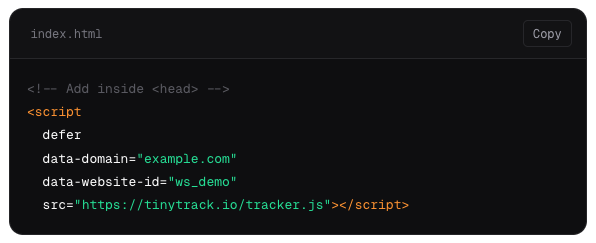 * **Static sites** — add it directly to your HTML template's `` section.
Open the dashboard, then open your website in a separate browser tab and navigate to any page. You can already see **Live visitors** counter in the dashboard.
## Next steps
Fire custom events from your JavaScript to track button clicks, form submissions, and any other user interaction beyond pageviews.
Define conversion goals and build multi-step funnels to see exactly where visitors drop off before completing an action.
* **Static sites** — add it directly to your HTML template's `` section.
Open the dashboard, then open your website in a separate browser tab and navigate to any page. You can already see **Live visitors** counter in the dashboard.
## Next steps
Fire custom events from your JavaScript to track button clicks, form submissions, and any other user interaction beyond pageviews.
Define conversion goals and build multi-step funnels to see exactly where visitors drop off before completing an action.